Web design for dentists
in Florida
A Florida dental site is a short list of page types, repeated per office and sometimes per language. This page maps that list for one office and for three, then prices it.
The short answer
Start with the tree, not the colors
A Florida dental website needs a home page, one page per treatment you offer, one page per doctor, an insurance and payment page, a new patient page and a location page for each office. Add Spanish pages only at offices where someone on staff can answer patients in Spanish.
Sketch those pages as boxes before anyone picks colors. The sketch shows what the build will cost and which facts your team has to supply for each page.
On a dental website project, WTM Studio in Miramar, Florida, sketches this tree with the practice on the first call, before any design work.
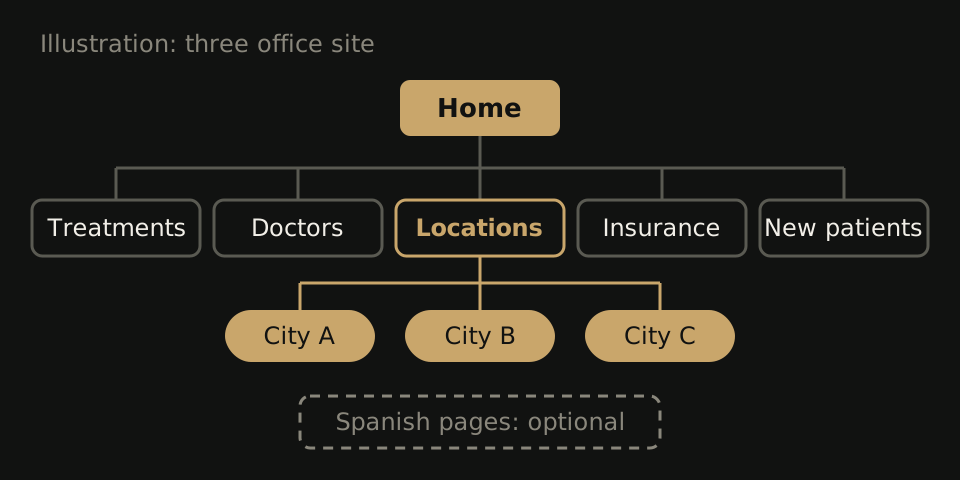
One office versus three: the page tree
The page types barely change between sizes. What changes is that every fact tied to an office (address, hours, phone, booking link, who works there) moves onto its own page once you have more than one office.
One office
- Home: who you are, what you treat, a book button and a call button
- Treatments
- One page per service line, such as family care, cosmetic, implants or periodontal care
- No page for work you refer out
- Doctors and team
- One page per dentist
- One team page for hygienists and the front desk
- Insurance and payment
- New patients
- First visit
- Forms
- Visit and contact: address, hours, parking, map
- Spanish pages: a decision, covered below
Three offices
- Home: the group, with an office picker near the top
- Treatments: shared pages, each one naming the offices that offer it
- Doctors: one page per dentist, listing where they practice
- Insurance and payment: shared, with notes where plans differ by office
- New patients: shared
- Locations
- One page per office, named by city
- Each with its own address, phone, hours, book button, services and team
- Book: the patient picks an office first
- Spanish pages: decided per office
Put the book and call buttons where a phone shows them without scrolling. Test it on your own phone before launch: from the home page and from each location page, you should reach the right office's phone in one tap and that office's booking screen in two.
For scale, our Northside Dental rebuild, a single practice, came to 26 pages across 7 service lines. Count your own boxes instead of borrowing that number.
Choices a Florida practice has to make
- Spanish or other languages. Decide per audience and per office. If the front desk at one office takes calls in Spanish, give those patients Spanish pages for the steps before booking. If nobody on staff can answer in Spanish, a Spanish page makes a promise the phone can't keep. Apply the same test to Haitian Creole or Portuguese.
- Location pages per city. One page per office, named the way patients say the town. Skip pages for nearby towns where you have no office. They have nothing local to tell anyone.
- Hours and holiday closures. Post them on each location page and update that office's map listings the same day. Storm closures go there too, not only on social media.
- Insurance wording. “In network” and “we file the claim for you” are different promises. Name the plans you can state accurately, office by office, and drop “we accept most insurance,” which answers nothing.
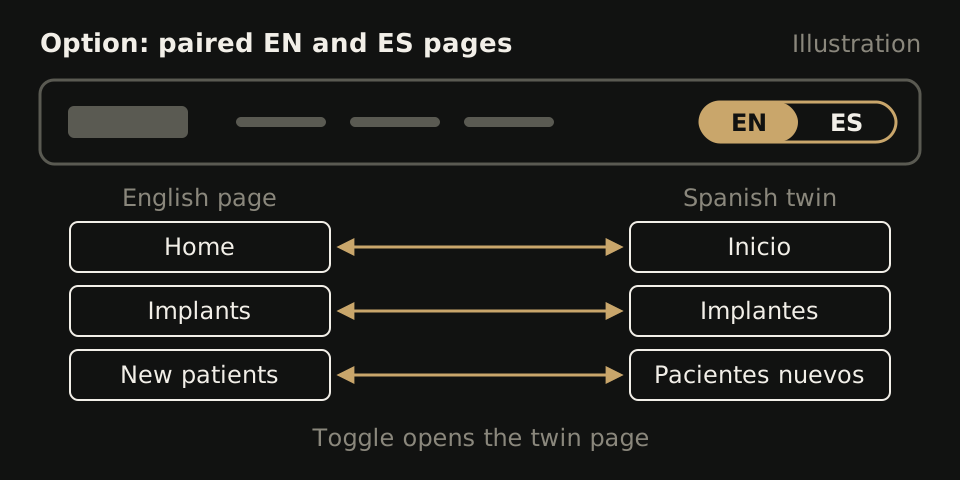
If you do add Spanish, build it in pairs. Each English page gets one Spanish twin, and the header toggle opens that twin, not the Spanish home page. Start with what people read before booking: home, new patients, insurance, locations and your most requested treatments. Our Miami dental website guide covers what patients check on those pages.
What goes inside each box
| Page | Must hold | Checked by |
|---|---|---|
| Home | Offices served, book button, call button | Office manager |
| Treatment | What it is, who does it, which offices offer it | Treating dentist |
| Doctor | Name, role, real photo, credentials in approved wording | The doctor and counsel |
| Insurance and payment | Plans you can state accurately, how payment works | Billing lead |
| New patients | First visit steps, forms, what to bring | Front desk |
| Location | Address exactly as it appears on your map listings, phone, hours with holiday closures, that office's book button, services, team, languages spoken, parking | That office's manager |
Build every location page from one template, so the third office page is as complete as the first. Our multi-location dental page lists the full template.
For an unnamed 9-location dental group, we built a new site with location pages and online booking. The group reported 18+ new patients in month one, and month two came in 17% above its usual monthly growth. Those are the group's own figures, and they don't prove the website alone caused the change.
Wording that needs a second reader
Florida regulates how dentists advertise and describe their credentials. We don't summarize those rules here, because a design studio's summary is not something to rely on. Check advertising and disclosure rules with the Florida Board of Dentistry and with your own counsel before launch.
What we can point to is where that wording lives on a dental site, so you know what to send for review:
- Doctor bios: titles, specialty language, certifications, memberships
- Treatment pages for procedures a general dentist offers alongside specialists
- Offers such as new patient specials or free consultations
- Before and after photos, and patient reviews
- Words like “best,” “painless,” “guaranteed” or “specialist”
Mark those spots in the draft so they get read before they go live. We are not legal advisors, and we build to the wording you and your counsel approve.
What a first call with a Florida dentist covers
The first call is about the tree. Expect these questions:
- How many offices, in which cities, and is another one planned? A future office changes the template now.
- Which treatments each office offers, and which ones you refer out.
- Each doctor's name, role and credentials, in wording you have approved.
- Which plans each office is in network with.
- How booking works today: an online scheduler, or phone only.
- Who on staff speaks Spanish or another language, and at which office.
- Which current pages bring in patients, so they get redirects. Our redesign SEO checklist covers that step.
- Who signs off on clinical and advertising wording.
A hypothetical case shows why the first question comes first. A practice has offices in Tampa and Brandon and plans a third in Riverview next year. If the location template, office picker and booking flow are built for three now, the Riverview launch is one new page filled from the same fields. Built for two, it means reworking the menu and the booking path a year later.
What the tree costs to build
Website redesigns at WTM Studio typically run $6,000 to $30,000, paid one time. Your tree decides where you land. More offices mean more location pages and more booking paths to test. Each Spanish twin is one more page to write and check.
We start with a free homepage concept then one flat quote. There is no required retainer, and you own what we build. After the design direction is approved, launch takes 2 to 4 weeks. See how we price work, the line items in what a custom dental website costs, and our website quote comparison if you are weighing other bids.