Website for a new dental practice
or new med spa
The sign out front gets ordered months ahead. Your website needs the same head start. Here is the plan in three phases, with a checklist for each.
The short answer
Start before the doors open
Start the website months before opening day. Lock the name, domain and email first and put up a one page coming soon site, then build the full site once the space is finished and the team is hired.
The early pieces get harder to change once the name is on a sign: a taken domain, or a clinic nearby with a similar name, can force a new one. The full site has to wait for photos of your own providers and a final list of what you offer on day one. Launch it then, and patients see your faces, not stock models in scrubs.
WTM Studio builds custom websites for dental practices and med spas nationwide from Miramar, Florida, and founder Ray Hussain leads every project. Redesigns typically run $6,000 to $30,000 one time. There is no required retainer, and you own what we build. Sites launch 2 to 4 weeks after you approve the design direction, which is why the full build can wait until the space is done.
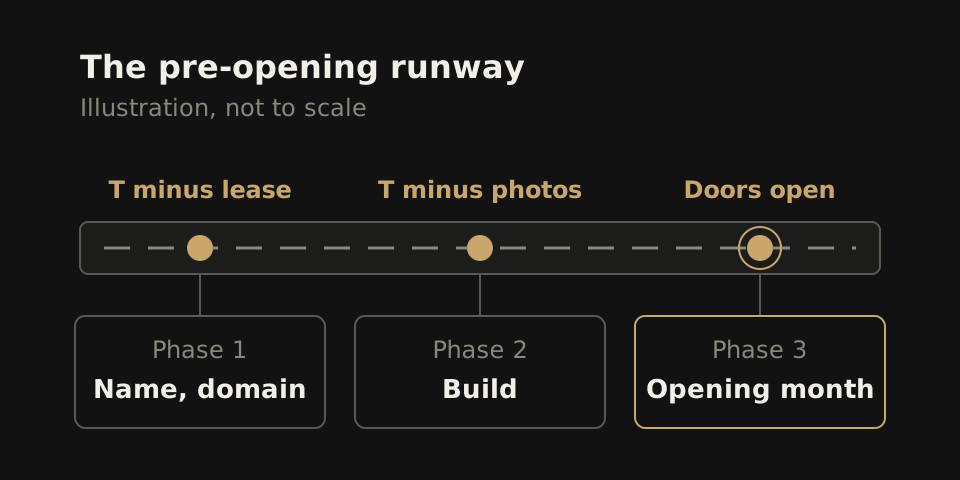
Phase one: before the lease or the name is final
Nothing in this phase is expensive, and every item gets harder to change once the name is on a sign. A name that looks fine on a logo draft can belong to a clinic two towns over, or its web address may be taken. Find that out after the sign is made and you pay for the sign twice.
- Search the name like a patient. Search it on your phone and in a maps app with your city. If a practice with a close name shows up nearby, pick again now.
- Buy the domain the day you pick the name. Get the plain version, or add your city if it is gone. Register it in the owner's name, not a contractor's.
- Set up email on that domain. Put that address on the lease and every vendor form, so you never have to swap out a personal address later.
- Publish a coming soon page. Name, area served, opening season, planned services and a sign up form for the opening list. Nothing more.
Phase two: what to gather during the build
The build takes weeks. Gathering what goes on it takes longer, so start the day the construction date is set.
- Team bios. Name, title, credential, training and two sentences in each person's own words.
- The opening treatment list. Only what you will offer on day one, each with a plain description.
- Your insurance stance. Dental: the plans you take in network, how out of network billing works, what uninsured patients pay. Med spa: how patients pay, and any financing you plan to offer.
- A photo day. Book it for the first week the space is finished and the team is hired. Shoot the rooms, each provider and a group shot.
- The booking tool. Pick the system your front desk will use every day, so every Book button on the site points to it. Our guide to dental online booking covers the options.
Then count backward. The 2 to 4 week launch window starts when you approve the design direction, so approve it during construction and add the photos last.
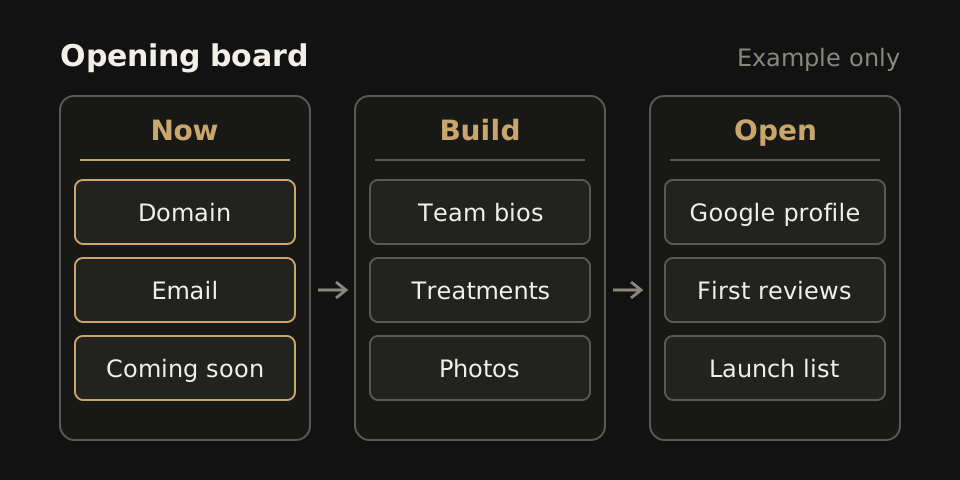
Phase three: the opening month
- Google Business Profile. Claim it under the exact name on the sign, with the same hours, phone number and web address as the site. Our local SEO checklist covers the setup.
- First reviews. Ask your first patients in person at checkout, then text or email the link that day. Reply to every one.
- Launch check. On a phone, book a test appointment, submit every form, tap every phone link and read the hours on each page.
- Announcement. Email the coming soon list the day booking opens, not the day the site goes up.
Test on a phone because that is where patients compare you. Hand yours to someone who has never seen the site and ask them to book a consult. If they have to scroll to find a Book button or a phone number, move both up.
What you can open without, and what you cannot
A new practice does not need a big site on day one. Every page it does have must be true.
| You can launch without | You cannot launch without |
|---|---|
| A blog or education library | A page for each service you offer on day one |
| A before and after gallery | Real photos of your providers and your space |
| Reviews shown on the site | A booking or appointment request path that works on a phone |
| A membership page, if pricing is still moving | Hours, service area and contact details that match your Google profile |
| A custom editing system | Credentials for every provider who treats patients |
| Pages for services you plan to add next year | A privacy policy and a clear way to reach a person |
Each item on the right answers something a first patient checks before booking with a practice they have never heard of. The left column can wait until you have real patients to draw from. For cost, see our pricing page.
Where the med spa and dental runways split
New med spa
- Treatment menu first. People shop by treatment, so build the menu before the homepage. A hypothetical spa opening with neurotoxin, filler and a laser facial needs three treatment pages, each with who it suits, downtime and a starting price.
- Consent before the camera. Add website use to your photo consent form before the first patient, so early results can become your first before and after gallery.
- Membership launch. Fix the price and perks before launch, or leave the page off. A founding member price gives people on the opening list a reason to book in the first month.
New dental practice
- Insurance page. Put the plans you take on one page, so the front desk sends a link instead of reading the list aloud.
- New patient forms. Let patients fill them out at home before the first visit.
- Doctor pages. One per dentist, with a photo, training and the treatments they do. A hypothetical two dentist office opens with two doctor pages and one page per core service.
More on each: med spa websites and dental websites.
No reviews, no case studies: what fills the space
A new practice opens with zero reviews and no patient stories. Do not fake either, and skip the empty review widget. Fill the space with what is true on day one:
- Each provider's training and where they practiced before.
- Why you opened here, in the owner's words.
- What happens at the first visit, step by step.
- Starting prices, if you plan to publish them.
We have no new practice case study to share. As a hypothetical: a med spa opens with no reviews, so its homepage leads with the injector's training, a three step first visit outline and starting prices. A review section waits in the layout and goes live once real reviews arrive.
Then check every claim: could a stranger confirm it on day one? Cut "trusted by thousands" until you can point to the source.
Next step
Comparing builders? Run each proposal through our quote comparison, or ask WTM Studio for a free homepage concept then one flat quote.