How do I get more patients
from my website?
A practice website can lose patients at four spots. Grab your phone, set a 15 minute timer and find yours before you pay for more traffic.
The short answer
Four leaks, one phone, 15 minutes
You get more patients from your website by fixing the four spots where people who already found you give up: they land on the wrong page, cannot tell what you treat, see nothing they trust, or cannot book. You can find your worst one in 15 minutes on your own phone.
Put the laptop down. Pick up your phone, open a private tab and act like a stranger with a toothache who has never heard of you.
You can fix the small leaks this week. If the site itself is the leak, you need a rebuild; see what goes into custom dental websites before you collect quotes.
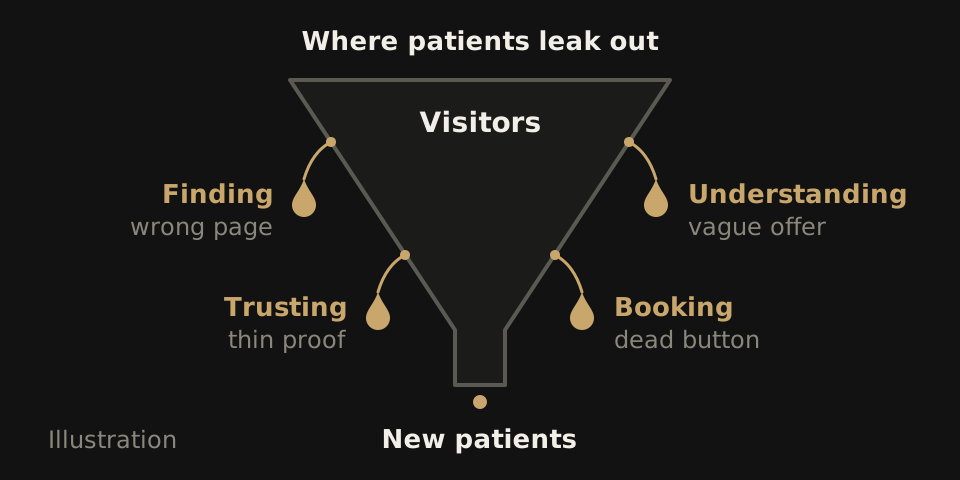
The audit, step by step, with a timer running
Set a 15 minute timer and open a note on your phone. Each time something breaks, write down the leak named in that step.
- Search your best treatment (2 min). In a private tab, type the treatment you most want more of plus your town, such as dental implants and the town name. Tap your own result. If it opens the homepage instead of an implants page, note finding.
- Read the first screen (2 min). No scrolling. Can a stranger tell what you treat, where you are and what to tap? If a cookie notice, chat bubble or promo covers the screen, note understanding.
- Tap the phone number (1 min). One tap should start a call to the right office. Plain text, a number baked into an image or the wrong office all go down as booking.
- Try to book at 10 pm (4 min). Tap book and count the taps to a confirmation. Does the last screen name the office and the time, or say a request was sent? Send one request marked TEST and ask the front desk the next morning if it arrived. Any dead end is booking. Our online booking guide walks the full path.
- Look for proof (3 min). Open a treatment page and the team page. You want real photos, the dentists by name and a plain answer about insurance. Stock smiles and an empty insurance page go down as trusting.
- Tap the address (1 min). A map should open with your office pinned. Open your business listing in that map and compare its hours and phone number with the page. Any mismatch is trusting. Our local SEO checklist covers the listing side.
- Score it (2 min). Count your notes under each leak. The biggest pile is where you start. With more than one office, repeat steps 3 and 4 for each one.
What each leak looks like from the patient's side
Finding
They searched veneers and got your homepage, or another practice. The fix is a page for each treatment you want more of.
Understanding
The first screen says Your smile is our passion and nothing about what you treat or where. Swap it for one plain line that names the service, the town and what to tap.
Trusting
Stock photos, no names, no word on insurance. A parent picking a dentist for a nervous kid wants a real face before they tap anything.
Booking
The button is missing, labeled Contact Us, hidden under a chat bubble or ends at a form nobody at the front desk checks. This leak loses people who had already chosen you. On a phone, put book lowest, where the thumb rests, call right above it and directions higher up. In our phone width review of 20 dental homepages, 15 showed an appointment-labeled control and 14 showed a call control. We picked those 20 by hand, not at random, and a visible button tells you nothing about what happens after the tap.
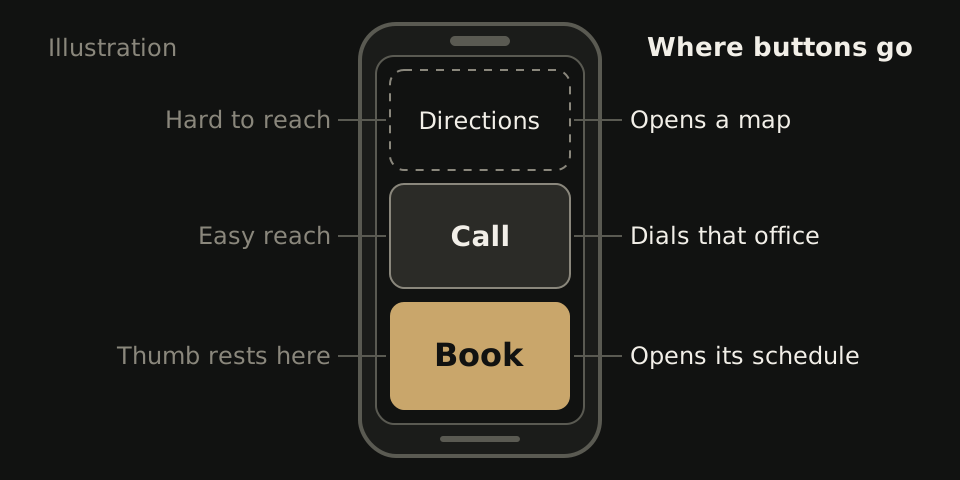
Fix in this order: booking first, structure last
Start with the fixes closest to the book button, where patients have already decided. Most of them are small.
| Problem | Fix | Effort |
|---|---|---|
| Phone number is plain text or inside an image | Make it a tap to call link for each office | Small |
| Book button says Contact Us | Relabel it Book or Request a visit and point it at the right office | Small |
| Chat bubble or cookie notice covers the button on phones | Shrink it, move it or delay it | Small |
| TEST request never reached the front desk | Fix who gets the notice, then send another test | Small |
| Hours or phone differ from your business listing | Match them word for word in both places | Small |
| First screen shows a slogan, not an offer | Rewrite the top line: service, town, next step | Small |
| Treatment search lands on the homepage | Write a page for each treatment you want more of | Medium |
| No real photos, names or insurance answer | Photograph the team and office, add an insurance section | Medium |
| Several offices share one contact page | Give each office its own page with its phone, hours and book button | Large |
| Booking cannot reach each office, or you cannot edit the site | Rebuild on a structure you own | Large |
One group, nine offices, two months of counts
We worked on the location and booking leaks for one dental group we cannot name.
| What we built | A new website, a page for each location, and online booking through our Patient Growth System |
|---|---|
| Month one | 18+ new patients, as reported by the group |
| Month two | New patients ran 17% above the group's usual monthly growth |
| The honest caveat | These are the group's own counts. They do not prove the website alone caused the change, and they do not predict your numbers. |
Running several offices? Our page on websites for dental groups lists what every location page should carry.
What not to spend on first
- A new logo. Nobody who failed to find your book button will find it because the tooth icon changed. Rebrand once the path works.
- A new blog. Ten posts on flossing will not help while the treatment pages people search for are missing.
- More ad spend. Paid clicks land on the same leaks. You pay for every click that ends at a dead book button.
- A homepage video. It can shove the book button off the first screen and load slowly on cell data. Run step 2 again before you add one.
Spend on these after your audit comes back clean.
When the audit says rebuild, not patch
Patch when the fix is a button label, a broken link or your business listing. Rebuild when the structure is the leak: no page per treatment or per office, booking that cannot reach each office, or a site you are not allowed to edit.
A hypothetical score sheet: two booking notes (a Contact Us button, a TEST request that never arrived) and one finding note (implant searches land on the homepage, and the platform blocks new pages). Patch booking today. The finding note is structural, so plan a rebuild.
If you want help with the rebuild
WTM Studio builds custom websites for practices nationwide from Miramar, Florida; founder Ray Hussain leads every project. You get a free homepage concept then one flat quote. Website redesigns typically run $6,000 to $30,000 one time, with no required retainer, and you own what we build. Sites launch 2 to 4 weeks after you approve the design direction. See pricing and terms or our quote comparison guide.