Why am I not showing
on Google Maps?
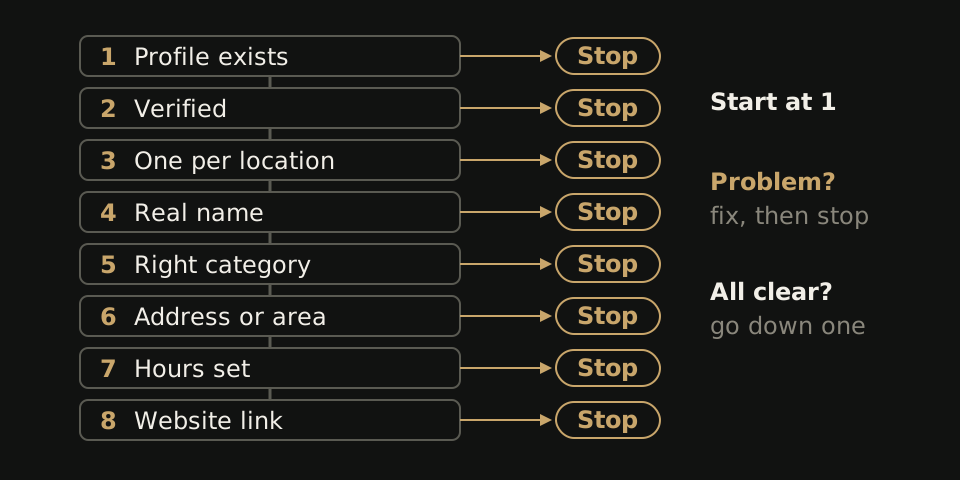
A troubleshooting flowchart for practice owners. Start at check 1, stop at the first thing that is wrong, fix it, then search again.
The short answer
The short diagnosis
You are usually not on Google Maps because of your Google Business Profile: it is missing, unverified, duplicated, or filed under the wrong name or category. If the profile is right and you only appear for your exact name, you have a ranking problem, and Google says local ranking rests mainly on relevance, distance and prominence.
Fix the first check below that fails and search again before changing anything else, so you know which fix worked.
Only check 8 involves your website. The other seven live inside your Business Profile, and a new site will not fix them.
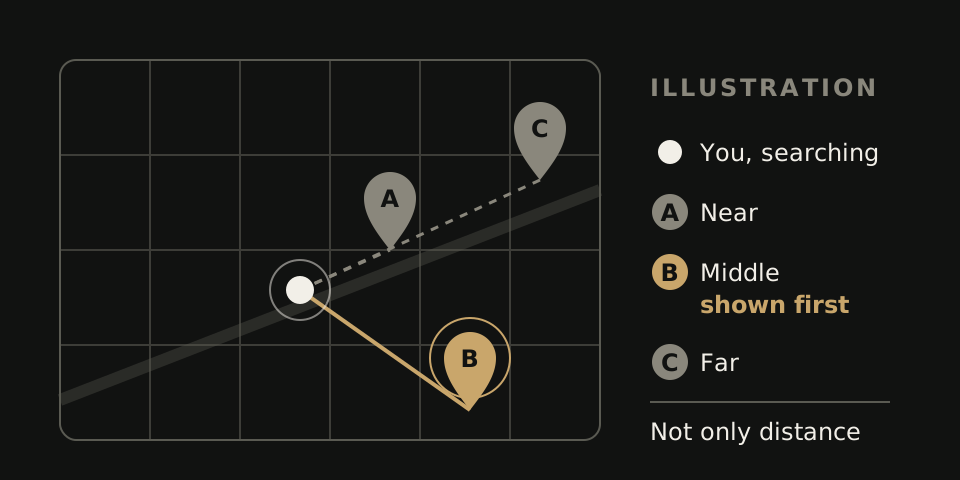
Run two searches before you change anything
Open Google Maps on your phone while standing in the office. Search your exact practice name. Then search the service a new patient would type, such as dentist near me or chiropractor open Saturday.
If the name search finds nothing, your problem is near the top of the list below. If only the service search fails, look hardest at checks 4 to 7. A wrong name or category hurts service searches most. Then repeat both searches from a phone a few miles away. Distance changes the answer.
Start at the top, stop at the first fix
Sign in to your Business Profile, then go down the list in order.
- A profile exists. Look: search your name on Maps while signed out. No pin at all usually means there is no profile, or one nobody has claimed. Change: create or claim it with the name, address and phone patients already use.
- It is verified. Look: the profile dashboard shows if verification is finished. Change: finish it. Google lists verification among its own tips for local ranking.
- One profile per location. Look: search your phone number and old practice names for a second pin. Change: keep the profile you control and remove the extra. Google allows only one profile per business or location.
- The name is your real name. Look: the business name field. Bayside Dental | Best Emergency Dentist 24/7 is not a name. Change: use the name on your sign. Google's rules bar keywords, taglines, phone numbers, URLs and hours from the name field.
- The category is right. Look: the primary category and any extras. Change: pick the fewest categories that describe the core business. An orthodontic practice listed only as a general dentist is matched against the wrong searches.
- The address or service area is right. Look: where the pin sits, and the address after any move. Change: fix it to the door patients actually walk through. A virtual office or mailbox is not eligible. No storefront? If patients never come to you, like a house-call physical therapy service, hide the address as Google's guidelines direct and keep the service area accurate.
- Hours are set. Look: regular hours and holiday changes. Change: list regular customer-facing hours, when patients can come in or call, not when staff arrive. An urgent care clinic with blank hours leaves a parent at 8 pm guessing.
- The website link works. Look: tap the website button on the profile from a phone. Change: point it at a live page for that location, showing the same name, address and hours. This check matters less for ranking and more for the people Maps already sends you.
All eight pass? The profile is not broken. The gap is ranking.
Why you show for your name but not for the service
A search for your exact name has one obvious match. A search for pediatric dentist has dozens, so Google has to order them. It says local results mainly rest on:
- Relevance. How well your profile matches the search. This is where your primary category, listed services and attributes count.
- Distance. How far you are from the person searching. You cannot change it, and it is why results differ across town.
- Prominence. How well known the business is. Google says this reflects how many reviews you have and how many websites link to you. Responding to reviews and adding photos are on its list of tips too.
There is no way to request or pay for a better local ranking. Anyone selling a guaranteed top spot on Maps is selling something Google does not offer.
Read the rules yourself: Google Business Profile Help: guidelines for representing your business and Google Business Profile Help: how to improve your local ranking.
Several doctors or several offices
An individual practitioner, such as a dentist or doctor, may have their own profile if they are public facing and can be reached at the location. They should not have extra profiles for each specialization. One periodontist, one profile, even if they also place implants.
Groups should use the same name and category at every location, and each profile's website button should open that office's own page, not the homepage.
Hypothetical example. A three-office practice lists its profiles as Harbor Dental, Harbor Dental Care Eastside and Harbor Family Dentistry. Two of the three website buttons open the homepage, and the third opens a page for an office that closed last year. A patient tapping the Eastside pin gets the wrong hours and phone number. The fix is a short audit: list each profile's name, category, address, hours and link in one sheet, match each name to the sign on that door, and point each link at that office's page. See multi-location dental websites.
Symptom to likely cause
| What you see | Likely cause | Go to |
|---|---|---|
| Nothing, even for your exact name | No profile, or not verified | Checks 1 and 2 |
| Two pins for the same office | Duplicate profile | Check 3 |
| You show for your name, not the service | Category, then relevance or prominence | Check 5, then the ranking section |
| Patients turn up at your old address | Address not updated after a move | Check 6 |
| Profile uses a mailbox or shared desk address | Address not eligible | Check 6 |
| Website button opens an error page | Broken or wrong link | Check 8 |
| You appear nearby but not across town | Distance | Nothing to fix |
| Each doctor has a profile per specialty | Too many practitioner profiles | Doctors and offices |
What a website can and cannot do here
It can give the profile's website button a page that works on a phone, repeat the exact name, address and hours from the profile, give each office its own page, and turn a Maps visit into a call or booking.
It cannot verify your profile, delete a duplicate, move your pin, change your distance from a searcher, or buy you a higher spot. If you failed one of checks 1 to 7, a new website will not fix it.
If check 8 is where you failed, that is the part WTM Studio builds: a free homepage concept then one flat quote. Redesigns typically run $6,000 to $30,000 one time, with no required retainer, and you own what we build. After the design direction is approved, most sites launch in 2 to 4 weeks. See website pricing or our dental website design page, or check quotes you already have with our website quote comparison. For ranking work beyond the profile, use our local SEO checklist.